> ## Documentation Index
> Fetch the complete documentation index at: https://docs.znapai.com/llms.txt
> Use this file to discover all available pages before exploring further.
# Azure Image editing
***
## Request
```shellscript cURL theme={null}
curl --location 'https://api.znapai.com/azure/openai/deployments/gpt-image-2/images/edits?api-version=2025-04-01-preview' \
--header 'Authorization: Bearer $ZnapAI_API_KEY' \
--header 'spend-logs-metadata: {"user_id": "user-123", "project_id": "proj_abc", "env": "production"}' \
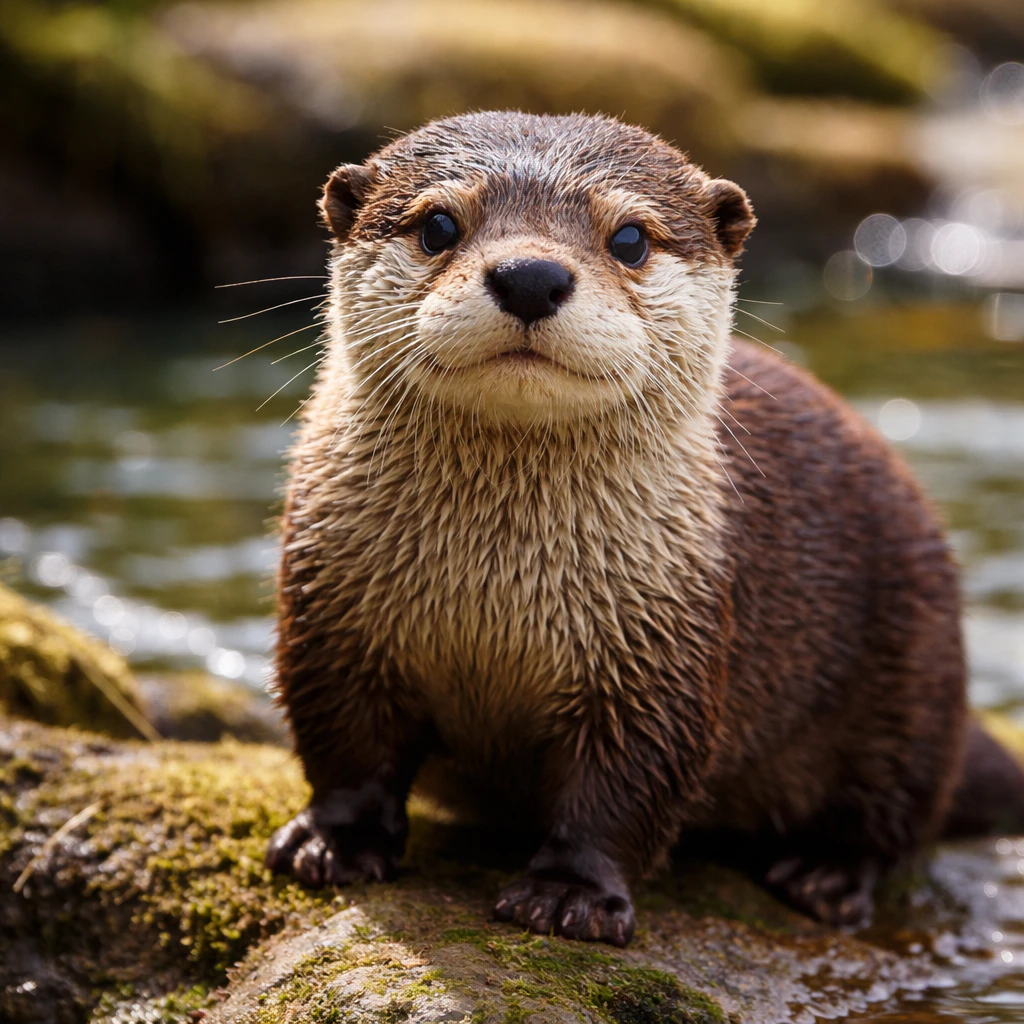
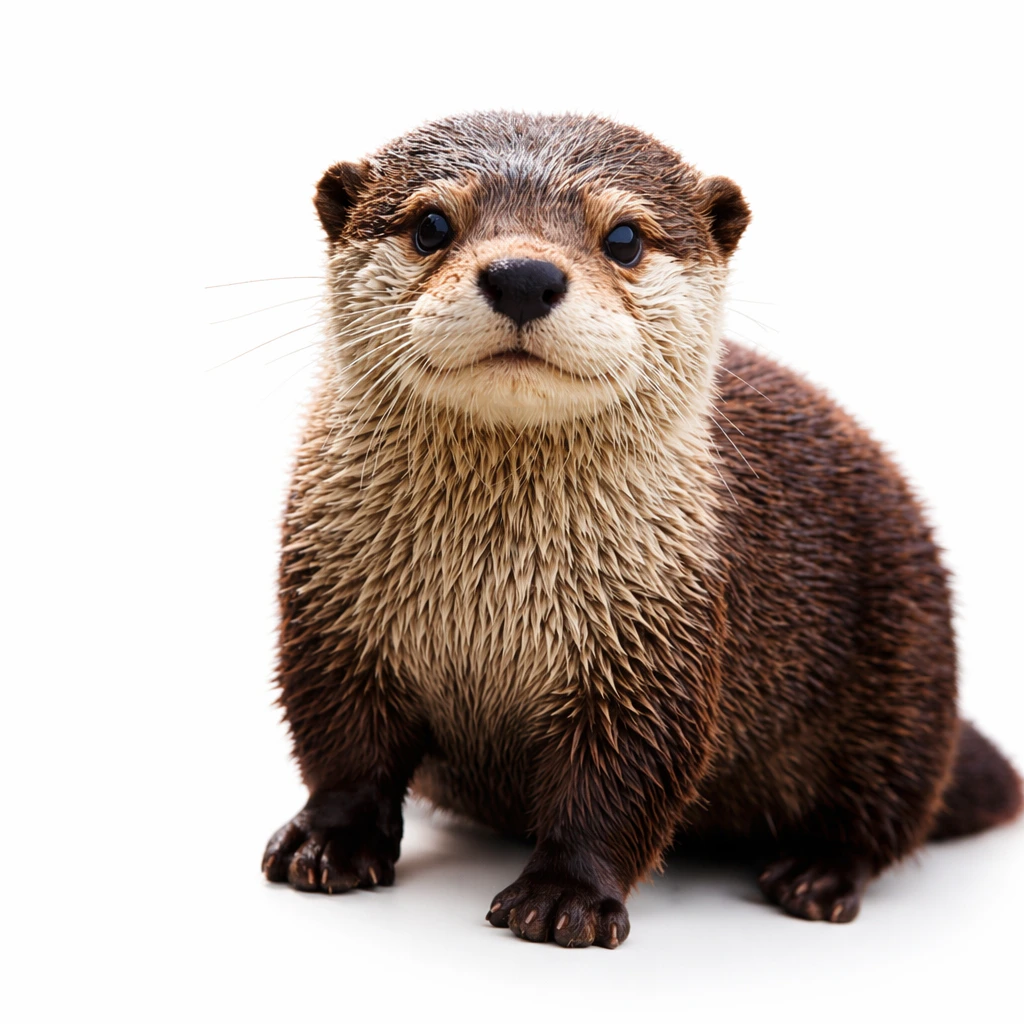
--form 'prompt="Replace the background with a clean white studio surface, keep the product exactly as is"' \
--form 'image=@"/path/to/image.png"' \
--form 'size="1024x1024"' \
--form 'quality="low"' \
--form 'output_format="png"'
```
## Input
 ## Response
```json theme={null}
{
"created": 1778264554,
"background": "opaque",
"data": [
{
"b64_json": "iVBORw0KGgoAAAANSUhEUgAABAAAAAQACAIAAADwf7zUAABKMGNhQlgAAEowanVtYgAAAB5qdW1kYzJwYQARABCAAACqADibcQNjMnBhAAAASgpqdW1iAAAAR2p1bWRjMm1hABEAEIAAAKoAOJtxA3VybjpjMnBhOjcyYzUxM2NmLTIzMDEtNDE3Mi05NmY1LTQxZTRlYTlhY2YxNQAAAAQjanVtYgAAAClqdW1kYzJhcwARABCAAACqADibcQNjMnBhLmFzc2VydGlvbnMAAAACGGp1bWIAAABBanVtZGNib3IAEQAQgAAAqDYK4QD2QDSDyQwDaAzHORAQnA5grxTBLPZgO2ucIGbAMC24AAm2cyz2aBucIANgAYwIAENpdJABgAW1xmAPFMAsAGAGxsAJlnsrnCts0LIACwAWyezYAAzLMZyQBIANg8D4nLzGUCzDPZgA0gAIvLZMA2WICNDGADtrHBtgFAAGAuc7r9I/fGiQEGVOvlAAAAAElFTkSuQmCC"
}
],
"output_format": "png",
"quality": "low",
"size": "1024x1024",
"usage": {
"input_tokens": 39,
"input_tokens_details": {
"image_tokens": 16,
"text_tokens": 23
},
"output_tokens": 196,
"total_tokens": 235
}
}
```
## Image from base64 data
## Response
```json theme={null}
{
"created": 1778264554,
"background": "opaque",
"data": [
{
"b64_json": "iVBORw0KGgoAAAANSUhEUgAABAAAAAQACAIAAADwf7zUAABKMGNhQlgAAEowanVtYgAAAB5qdW1kYzJwYQARABCAAACqADibcQNjMnBhAAAASgpqdW1iAAAAR2p1bWRjMm1hABEAEIAAAKoAOJtxA3VybjpjMnBhOjcyYzUxM2NmLTIzMDEtNDE3Mi05NmY1LTQxZTRlYTlhY2YxNQAAAAQjanVtYgAAAClqdW1kYzJhcwARABCAAACqADibcQNjMnBhLmFzc2VydGlvbnMAAAACGGp1bWIAAABBanVtZGNib3IAEQAQgAAAqDYK4QD2QDSDyQwDaAzHORAQnA5grxTBLPZgO2ucIGbAMC24AAm2cyz2aBucIANgAYwIAENpdJABgAW1xmAPFMAsAGAGxsAJlnsrnCts0LIACwAWyezYAAzLMZyQBIANg8D4nLzGUCzDPZgA0gAIvLZMA2WICNDGADtrHBtgFAAGAuc7r9I/fGiQEGVOvlAAAAAElFTkSuQmCC"
}
],
"output_format": "png",
"quality": "low",
"size": "1024x1024",
"usage": {
"input_tokens": 39,
"input_tokens_details": {
"image_tokens": 16,
"text_tokens": 23
},
"output_tokens": 196,
"total_tokens": 235
}
}
```
## Image from base64 data
 ***
## Parameters
An optional header used for spend logging metadata, containing JSON properties like `user_id`, `project_id`, and `env`.
Text description of the desired edit.
Reference image(s) to edit. Up to 16 images supported. Must be uploaded via multipart form data — image URLs are not supported.
* `-F "image=@file.png"` or `-F "image[]=@file1.png" -F "image[]=@file2.png"`
Alpha mask PNG. Transparent areas are regenerated; opaque areas are preserved. Must be uploaded via multipart — mask URLs are not supported.
* `-F "mask=@mask.png"`
Output image dimensions. Supports arbitrary `WIDTHxHEIGHT` where both edges are multiples of 16, aspect ratio between 1:3 and 3:1, max edge 3840.
Standard values: `1024x1024`, `1536x1024`, `1024x1536`, `auto`.
Supported values depend on the selected model. See the [OpenAI image generation guide](https://developers.openai.com/api/docs/guides/image-generation) for the latest model-specific ranges.
Allowed values: `low`, `medium`, `high`, `auto`
Number of edited images to return.
Allowed values: `png`, `jpeg`
`webp` is not supported on Azure gpt-image-2.
Compression level (0–100). Only applies when `output_format` is `jpeg`.
Allowed values: `auto`, `low`
Stream partial edit results.
Number of partial images during streaming (0–3). Only used when `stream` is `true`.
***
## Params to Avoid
| Param | Reason |
| --------------------------- | ---------------------------------------------------------------------------- |
| `response_format: "url"` | Returns empty response from Azure |
| `image_url` | Azure does not support image URLs — use file upload via multipart |
| `input_fidelity: "low"` | gpt-image-2 rejects it on edits |
| `background: "transparent"` | Not supported on Azure gpt-image-2 |
| `output_format: "webp"` | Not supported on Azure gpt-image-2 |
| `style: "vivid"` | dall-e-3 only |
| `spend-logs-metadata` | This metadata must be passed as an HTTP header, not in the JSON request body |
***
## Parameters
An optional header used for spend logging metadata, containing JSON properties like `user_id`, `project_id`, and `env`.
Text description of the desired edit.
Reference image(s) to edit. Up to 16 images supported. Must be uploaded via multipart form data — image URLs are not supported.
* `-F "image=@file.png"` or `-F "image[]=@file1.png" -F "image[]=@file2.png"`
Alpha mask PNG. Transparent areas are regenerated; opaque areas are preserved. Must be uploaded via multipart — mask URLs are not supported.
* `-F "mask=@mask.png"`
Output image dimensions. Supports arbitrary `WIDTHxHEIGHT` where both edges are multiples of 16, aspect ratio between 1:3 and 3:1, max edge 3840.
Standard values: `1024x1024`, `1536x1024`, `1024x1536`, `auto`.
Supported values depend on the selected model. See the [OpenAI image generation guide](https://developers.openai.com/api/docs/guides/image-generation) for the latest model-specific ranges.
Allowed values: `low`, `medium`, `high`, `auto`
Number of edited images to return.
Allowed values: `png`, `jpeg`
`webp` is not supported on Azure gpt-image-2.
Compression level (0–100). Only applies when `output_format` is `jpeg`.
Allowed values: `auto`, `low`
Stream partial edit results.
Number of partial images during streaming (0–3). Only used when `stream` is `true`.
***
## Params to Avoid
| Param | Reason |
| --------------------------- | ---------------------------------------------------------------------------- |
| `response_format: "url"` | Returns empty response from Azure |
| `image_url` | Azure does not support image URLs — use file upload via multipart |
| `input_fidelity: "low"` | gpt-image-2 rejects it on edits |
| `background: "transparent"` | Not supported on Azure gpt-image-2 |
| `output_format: "webp"` | Not supported on Azure gpt-image-2 |
| `style: "vivid"` | dall-e-3 only |
| `spend-logs-metadata` | This metadata must be passed as an HTTP header, not in the JSON request body |