Overview

Codex CLI is OpenAI’s terminal-based coding agent. It can be configured to use Znap AI through an OpenAI-compatible endpoint.

Step 1: Install Codex CLI

Install globally using npm:
npm install -g @openai/codex
Verify installation:
codex --version

Step 2: Log Out of Existing OpenAI Sessions

If you have previously logged into Codex using a ChatGPT account, clear the existing authentication first:
codex logout
This ensures Codex uses your custom configuration instead of stored OpenAI credentials.

Step 3: Configure Codex

Open the config file:
C:\Users\<your-username>\.codex\config.toml
Add the following:
openai_base_url = "https://api.znapai.com/v1"
model = "gpt-5.3-codex"
model_reasoning_effort = "high"
Save the file.

Step 4: Start Codex

Launch the CLI:
codex
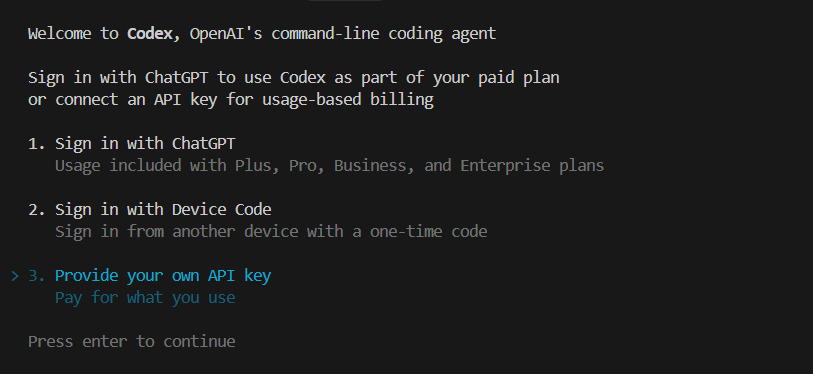
Codex Terminal
When prompted, select:
Provide your own API key
Paste your Znap AI API key.

Step 5: Verify Setup

Run a simple prompt:
What is 2 + 2?
If Codex responds successfully, the configuration is working.

Changing Models

Update the model field in your configuration file:
C:\Users\<your-username>\.codex\config.toml
Example:
model = "gpt-5.3-codex"
Restart Codex after making changes.

Notes

  • Codex uses the OpenAI Responses API internally.
  • Znap AI successfully routes Codex requests through its OpenAI-compatible endpoint.
  • At the time of writing, GPT-based models have been verified to work reliably with Codex.
  • If you encounter errors such as:
    stream disconnected before completion
    
    try switching to a GPT-based model and restart Codex.

Troubleshooting

Requests Still Going to OpenAI

Run:
codex logout
Then restart Codex and re-enter your Znap AI API key.

Invalid API Key Error

Ensure you are using your Znap AI API key and not an OpenAI API key.

Stream Disconnected Before Completion

This usually indicates a compatibility issue between the selected model and Codex’s Responses API requirements. Switch back to a GPT-based model:
model = "gpt-5.3-codex"
and restart Codex.

Current Recommendation

For Codex CLI, the most reliable configuration currently tested is:
openai_base_url = "https://api.znapai.com/v1"
model = "gpt-5.3-codex"
model_reasoning_effort = "high"
This configuration has been verified to work successfully with Znap AI.